
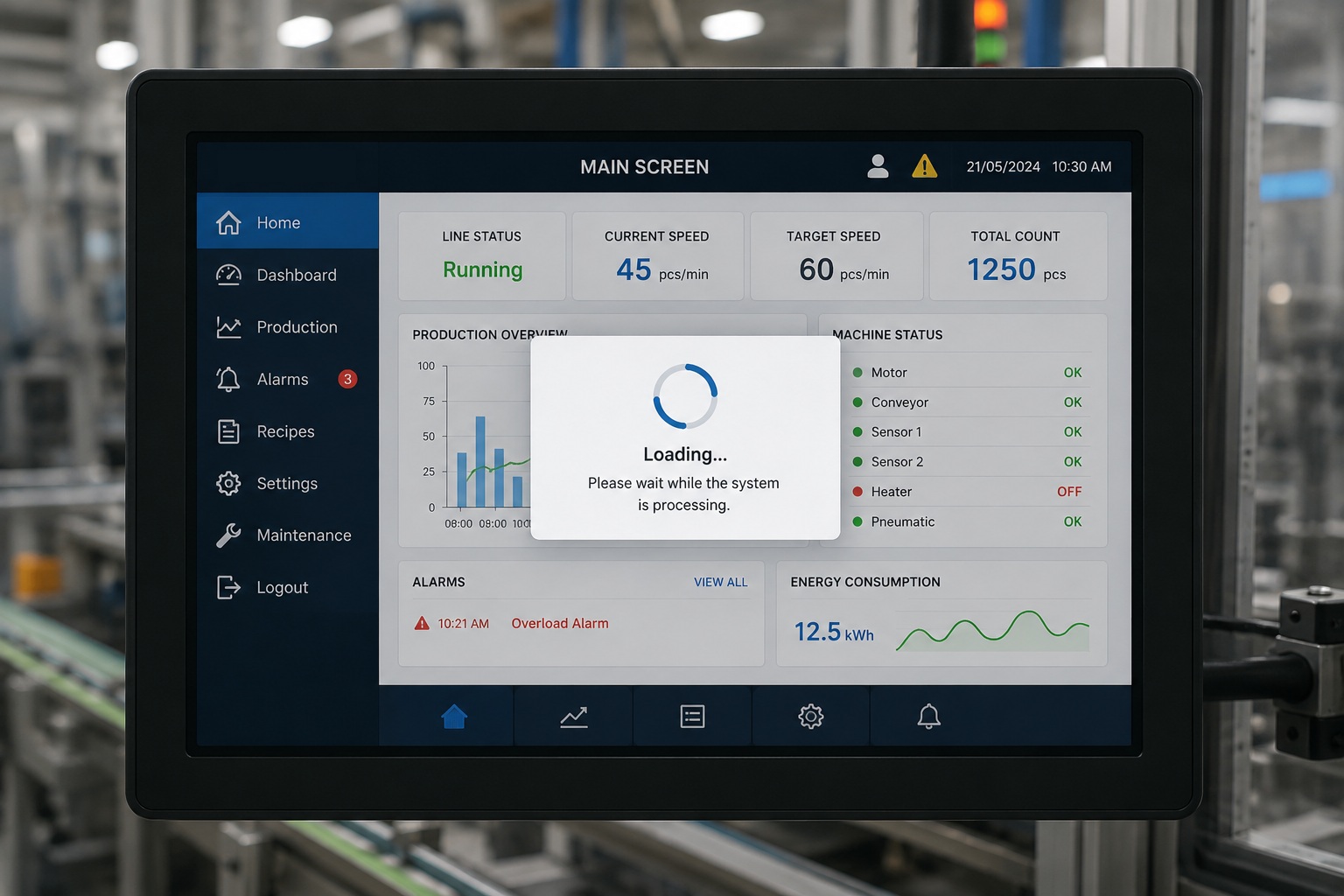
In modern embedded systems, users expect immediate feedback whenever the system is processing a task. Whether a device is booting, downloading data, validating user input, or communicating with external hardware, the interface should clearly indicate that work is in progress. A Busy Indicator Widget solves this problem by displaying an animated visual that informs users the application is active and responsive.
Sparklet UI Designer provides a configurable Busy Indicator Widget that allows developers to create smooth loading animations with minimal effort. Instead of building custom animations from scratch, developers can configure the widget using simple properties such as animation speed, rotation direction, and image resources.
What is a Busy Indicator Widget?
A Busy Indicator Widget is an animated UI component that indicates the system is currently performing an operation. Unlike a progress bar, it does not display completion percentage. Instead, it continuously animates until the operation finishes.
This widget is especially useful when the duration of an operation is unknown or varies depending on hardware performance, communication delays, or background processing.
A busy indicator reassures users that the application has not frozen and is actively working behind the scenes.
Common examples include: System startup, Data synchronization, Firmware update preparation, Network communication, Sensor initialization, Background calculations.
Why is a Busy Indicator Important?
One of the biggest usability issues in embedded applications is the lack of visual feedback during processing.
Without an activity indicator, users may assume the device has stopped responding and repeatedly press buttons, restart the device, or interrupt critical operations.
A Busy Indicator improves the user experience by:
- Providing immediate visual feedback
- Reducing user confusion
- Preventing unnecessary user interactions
- Improving perceived system performance
- Making the interface appear responsive even during lengthy operations
Although the animation itself performs no processing, it communicates that the application is functioning correctly.
Busy Indicator Widget in Sparklet UI Designer
Sparklet UI Designer simplifies the implementation of loading animations through its configurable Busy Indicator Widget.
Instead of writing animation logic manually, developers configure the widget directly through the Properties panel.
Some of the key properties include:
Rotation Type: Developers can define the animation direction. Examples include: Clockwise rotation and Anticlockwise rotation. This provides flexibility for different UI styles.
Animation Speed : The Busy Indicator animation is controlled using two properties:
Animation Ticks – Specifies the time interval (in milliseconds) between animation updates. Lower values refresh the animation more frequently, while higher values increase the time between updates. Increment per Tick – Specifies how much the animation advances during each update. The value represents the percentage of a complete animation cycle. Higher values produce larger rotation steps, whereas lower values create smoother, more gradual movement.
Together, these properties determine the overall animation behavior. By adjusting both the update interval and the amount of progress made in each update, developers can fine-tune the speed and smoothness of the Busy Indicator to match their application's user experience.
Rotation Properties : Flint also provides image rotation settings including: Pivot Point, Rotation Center, Start Angle, End Angle, Current Angle, Image Style
These properties ensure the animation rotates accurately around the desired center.
Real-World Applications of Busy Indicator Widgets
Busy indicators are found across almost every embedded industry because background processing is common in real-world devices.
Automotive Displays
Vehicle infotainment systems frequently display loading animations while:
- Booting the system
- Connecting Bluetooth
- Loading navigation maps
- Updating media libraries
The indicator informs drivers that the requested function is still processing.
Medical Devices
Medical equipment often performs initialization before displaying patient information. Examples include:
- Patient monitors
- Infusion pumps
- Ultrasound systems
- Diagnostic equipment
A Busy Indicator assures operators that the device is actively preparing the system.
Industrial HMIs
Industrial machines continuously communicate with PLCs, sensors, and field devices.
Busy indicators are commonly shown during:
- Recipe loading
- Machine startup
- Network communication
- Parameter downloads
- Firmware updates
This prevents operators from interrupting ongoing processes.
Consumer Electronics
Smart appliances and home automation devices use loading indicators during:
- Wi-Fi pairing
- Cloud synchronization
- Device updates
- Initial configuration
The animation improves user confidence while setup completes.
IoT Devices
Embedded IoT products often experience unpredictable communication delays.
Busy indicators provide feedback while:
- Sending telemetry
- Downloading configuration
- Connecting to servers
- Authenticating users
Benefits of Using Sparklet's Busy Indicator Widget
Using the built-in Busy Indicator Widget offers several advantages over implementing custom loading animations. These include:
- Faster UI development
- Consistent animation behavior
- Easy property-based configuration
- No manual animation coding
- Reusable across multiple projects
- Flexible image customization
- Suitable for MCU and MPU applications
- Seamless integration with Sparklet UI Designer workflows
By leveraging built-in properties for positioning, animation, rotation, and state management, developers can implement responsive loading indicators with significantly less development effort.
Conclusion
A Busy Indicator Widget may appear simple, but it plays a critical role in creating responsive and user-friendly embedded interfaces. It provides clear feedback during background operations, improves the overall user experience, and increases user confidence that the system is functioning correctly.
Sparklet UI Designer makes implementing busy indicators straightforward through an intuitive property-based configuration approach. With support for customizable images, rotation settings, animation controls, and state management, developers can quickly add professional loading animations to automotive, medical, industrial, consumer, and IoT applications without writing complex animation logic.
Whether your application is initializing hardware, communicating with peripherals, or processing data in the background, the Busy Indicator Widget helps deliver a polished and responsive embedded GUI experience.
https://sparkletui.com/documentation/flint-ui-designer/widgets/widgets.html#busyindicator-widget