The Flint Design Workflow

Design embedded UIs visually, without writing C code. Flint generates optimised, platform-agnostic C that compiles on any MCU or MPU build system — and ships with a one-click export.
A no-code embedded GUI design tool is a WYSIWYG application that lets engineers and designers build graphical user interfaces for MCU- and MPU-based hardware without hand-writing display or widget code. The tool exports production-ready C source files that compile directly into the target firmware. Flint UI Designer is Sparklet's implementation of this concept — purpose-built for embedded constraints from day one, not adapted from a desktop-first IDE.
Traditional embedded GUI development requires a specialist to hand-code every widget layout, animation, and state transition in C. A change to a button position means editing source files, recompiling, flashing, and re-testing. Flint replaces this loop with a live canvas: drag a widget, set its properties, preview the result immediately, and export the diff. The same project file targets Renesas, NXP, STM32, Nuvoton, Rockchip, and any other platform supported by Sparklet — no porting work required between targets.
Flint is not a general-purpose design tool. Every feature — asset compression, state machine wiring, font rasterisation, 3D mesh import — is oriented around the constraints of embedded systems: limited Flash, limited RAM, deterministic execution, and real-time responsiveness.
Four integrated modules that cover the complete embedded GUI design-to-deploy workflow.
Every widget property — position, size, colour, font, image, opacity — is editable in the property panel and reflected on the canvas in real time. Import PNG, JPG, or BMP assets; Flint automatically compresses and colour-converts them for the target Flash budget. Build a fully interactive prototype — linking screens, defining touch zones — without touching a compiler.

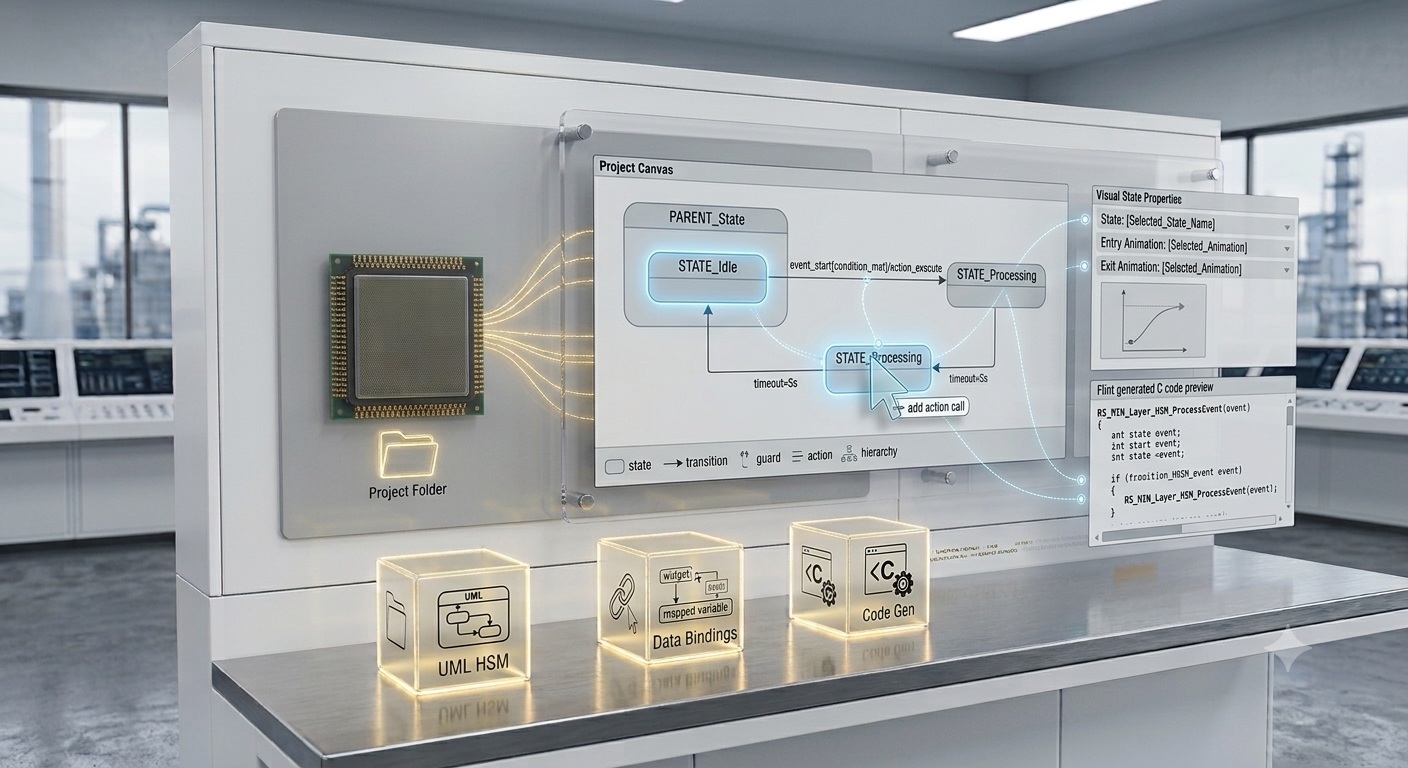
Draw states, transitions, and guards visually using UML statechart conventions. Flint generates the corresponding C hierarchical state machine (HSM) code using Sparklet's RS_MIN layer. Every state can have entry and exit animations assigned from the Animation Designer. Data binding maps widget properties to application variables — widget updates happen automatically on data change, with no application API calls needed.

Flint handles every asset type required for a modern embedded GUI. Raster images (PNG, JPG, BMP) are colour-converted to match the target framebuffer format (RGB565, ARGB8888) and compressed. TTF and OTF font files are rasterised at the required point sizes, with only the Unicode glyph ranges selected included in the export. 3D model files (.obj, .fbx) are imported and optimised for the target GPU pipeline.

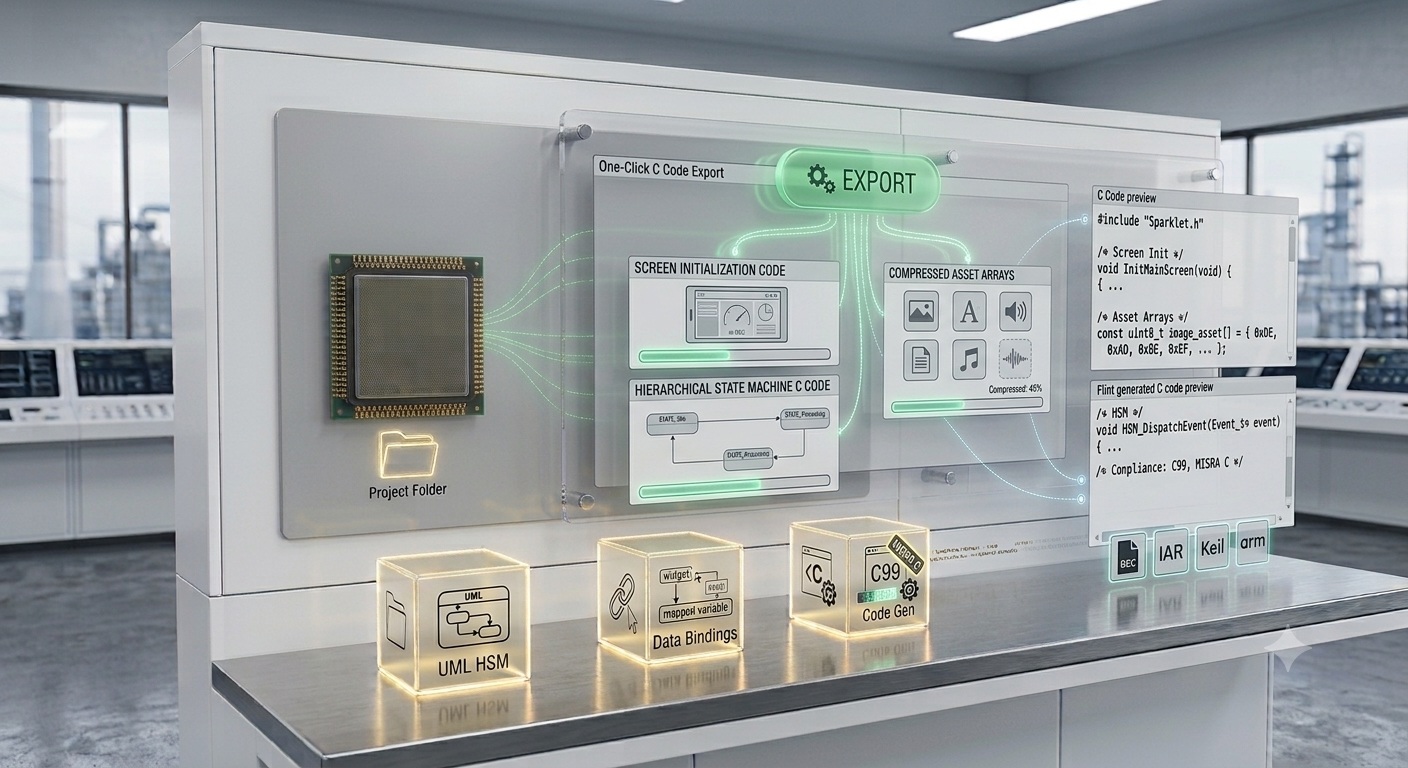
Click Export. Flint produces three categories of output: screen initialisation code, compressed asset arrays, and hierarchical state machine C code. All output is plain C99, MISRA C-compliant, and compiles with GCC ARM, IAR, Keil MDK, or any standard C toolchain. No proprietary binary blobs or runtime dependencies are injected into the export.

Every Flint export produces C code that contains zero hardware calls. There are no display controller commands, no DMA configuration writes, no RTOS-specific calls. All hardware interaction is routed through Sparklet's Hardware Abstraction Layer (HAL), written once per target board. The identical Flint-generated C code compiles and runs on a Renesas RH850, NXP i.MX RT1170, STM32H7, Infineon TRAVEO T2G, or the Windows x86 PC simulator — with only the HAL differing.
Switching targets requires only a recompile with the target-specific Sparklet HAL. This is not a configuration option; it is a structural property of how the generated code is organised. Product teams porting an existing embedded GUI to a new MCU or MPU reuse the full Flint project without modification. Visit the Supported Platforms page for the complete list of verified platforms and toolchains.
Flint exports a standard C source tree: one directory for screen code, one for asset code, one for state machine code. This tree is added to your existing Makefile, CMakeLists.txt, IAR project, or Keil MDK project as a source path. No special export format, no custom IDE plugin, no proprietary build tool required. The export integrates with version control cleanly — each export produces deterministic output for unchanged inputs, so diffs contain only lines that reflect real design changes.

Customers report up to 70% reduction in GUI development time compared to fully hand-coded embedded UI workflows — delivering production UIs in days, not months.

The designer works visually in Flint while the firmware engineer connects data sources and implements event logic. The state machine interface defines the boundary — no informal API negotiation.

Run Flint-generated C on Windows or Linux before flashing. Validate all interactions, animations, and data-driven transitions with zero hardware required. More →
Import Figma frames directly into Flint. Layers map to Sparklet widgets; assets are extracted and compressed automatically. Start from a designer's existing work, not a blank canvas. More →

Timeline-based keyframe editor. Control every widget property — position, opacity, scale, colour — frame by frame. Chain animations into sequences triggered by state transitions. No interpolation code required.

Draw UML statecharts visually. Define states, guard conditions, and transitions; Flint generates clean C HSM code using Sparklet's RS_MIN layer with no manual state management code.

One-click C export. Platform-agnostic output: screen layouts, asset arrays, font tables, state machine — all in plain C99, MISRA C-compliant, compiling on any toolchain.
Run Flint-generated C on Windows or Linux before flashing. Full interaction simulation — touch events, data binding, animations — zero hardware required.
Import Figma frames directly. Layers map to Sparklet widgets; assets are extracted and compressed automatically for the target Flash budget.

AI-assisted layout generation and widget suggestion. Describe your screen in plain language; Flint proposes a starting point for your canvas.
Flint UI Designer is Sparklet's WYSIWYG, drag-and-drop design tool for creating embedded graphical user interfaces. It lets designers and engineers build screens visually, wire application logic through a UML state machine editor, and export optimised C code for any MCU or MPU platform — without writing manual UI code.
Download the Sparklet evaluation package — includes Flint UI Designer, evaluation binary, sample projects, and documentation. No per-unit royalties. Free to evaluate on all supported platforms.