
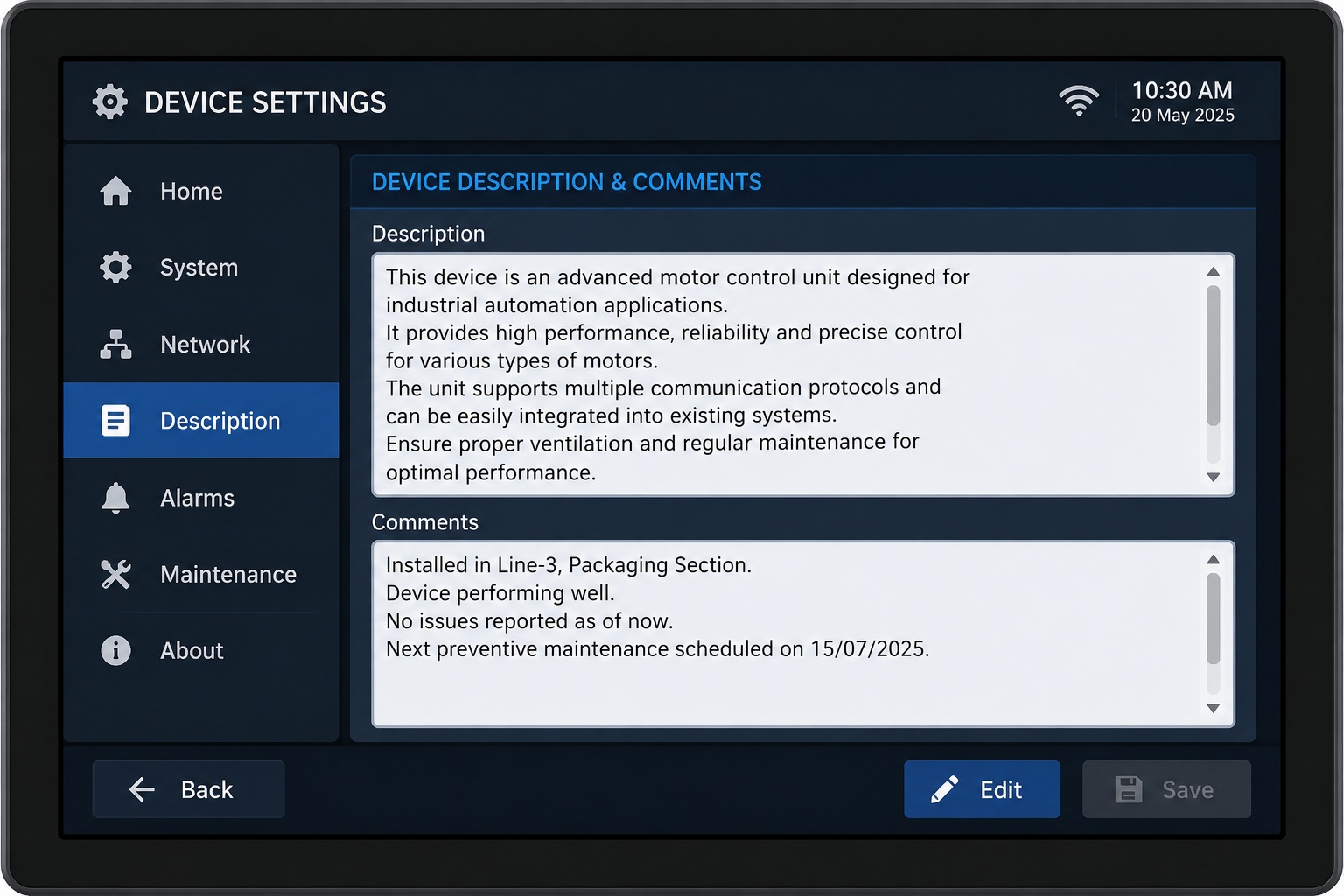
Modern embedded graphical user interfaces (GUIs) often need to display more than a single line of text. Whether it's showing machine status, diagnostic logs, user instructions, or warning messages, developers require a widget that can present larger amounts of information clearly without cluttering the screen.
The Text Area Widget in Sparklet is designed specifically for this purpose. Unlike a standard text field that is limited to a single line, a text area supports multiline text, making it ideal for embedded HMIs where readability and organized information are essential.
In this guide, we'll explore what the Sparklet Text Area widget is, why it's important, its key features, practical applications, and best practices for building intuitive embedded user interfaces.
What is a Text Area Widget?
A Text Area Widget is a graphical user interface component used to display multiple lines of text within a defined rectangular region. It provides enough space to present longer messages, descriptions, logs, or instructions that cannot fit into a single-line text widget.
In Sparklet, developers can customize the Text Area widget using various properties, including: Position and size, Background color, Text color, Font selection, Text spacing, Visibility, UI states and Dynamic text through Text Data ID.
These properties allow the widget to integrate seamlessly into industrial HMIs, automotive dashboards, medical devices, and consumer electronics while maintaining a consistent visual design.
Why is a Text Area Widget Needed?
Embedded GUI applications often need to display information that extends beyond a single line, such as system logs, operational messages, user instructions, or diagnostic details. Using a standard text widget for this type of content can lead to truncated text and a poor user experience.
The Text Area Widget in Sparklet addresses this by providing a dedicated area for displaying multiline text. When the text content exceeds the height of the widget, a vertical scrollbar allows users to navigate through the additional content without increasing the widget's size or affecting the overall screen layout.
This makes the Text Area widget ideal for applications where the amount of displayed text can vary dynamically while maintaining a clean and organized user interface.
By combining multiline text support with automatic scrolling, the Sparklet Text Area widget enables developers to present large amounts of information efficiently while preserving valuable screen space.
Key Features of the Sparklet Text Area Widget
The Sparklet Text Area widget offers several features that help developers create flexible and visually appealing interfaces.
Multiline Text Display:Displays multiple lines of text within a single widget, improving readability for longer messages.
Flexible Styling: Developers can customize Font, Text color, Background color, Text spacing to match the application's visual theme.
Dynamic Text Support: Using the Text Data ID property, applications can update displayed text dynamically at runtime, making the widget suitable for live system information.
Configurable Layout: The widget allows developers to define Width, Height and Position to fit different screen sizes and interface layouts.
State-Based Appearance: Different UI states enable the widget to adapt its appearance according to application conditions.
Automatic Vertical Scrolling: The Sparklet Text Area widget automatically displays a vertical scrollbar when the text content exceeds the widget's height. This allows users to browse lengthy content without resizing the widget, making it suitable for displaying logs, instructions, notifications, and other dynamically changing information.
Real-World Use Cases
The Sparklet Text Area widget is suitable for many embedded GUI applications.
Industrial HMIs
- Machine status
- Maintenance instructions
- Alarm descriptions
- Production messages
Automotive Displays
- Warning messages
- Vehicle diagnostics
- Driver notifications
Medical Devices
- Patient instructions
- Device status
- Treatment information
- Alert messages
Smart Home Appliances
- Wi-Fi setup instructions
- Device configuration
- Error messages
- User guidance
Consumer Electronics
- Help screens
- Firmware update information
- Product details
- User notifications
Benefits of Using the Text Area Widget
Implementing a Text Area widget provides several advantages.
- Improved Readability- Multiline formatting allows users to read lengthy content comfortably.
- Better User Experience- Organized text makes interfaces more intuitive and reduces confusion.
- Efficient Screen Space Usage- Instead of displaying multiple labels, a single text area can present structured information compactly.
- Dynamic Information Display- The widget can update content during runtime without redesigning the interface.
- Consistent UI Design- Sparklet's styling options help maintain a consistent appearance across the entire application.
Customizing the Text Area Widget in Sparklet
Sparklet provides a range of configurable properties that allow developers to tailor the widget to their application's needs.
Common customization options include: Widget dimensions, Position on screen, Fill color, Text color, Font selection, Text spacing, Visibility, UI states and Dynamic text using Text Data ID
These options enable developers to create interfaces that are both functional and visually consistent across different embedded devices.
Best Practices
To maximize usability:
- Keep text concise and easy to understand.
- Use readable font sizes for the target display resolution.
- Maintain sufficient contrast between text and background colors.
- Update dynamic content only when necessary to improve performance.
- Reserve the Text Area widget for multiline information rather than short labels.
- Organize long messages into logical paragraphs for easier reading.
Conclusion
The Text Area Widget in Sparklet is an essential component for embedded GUI applications that need to present multiline information clearly and efficiently. From industrial automation and automotive displays to medical devices and smart home products, it enables developers to deliver informative, user-friendly interfaces while maintaining a clean visual design.
With customizable styling, dynamic text support, configurable layouts, and state-based appearance, the Sparklet Text Area widget offers the flexibility required to build modern embedded HMIs. By following best practices and leveraging its customization options, developers can create interfaces that are both visually appealing and easy to use.
https://sparkletui.com/documentation/flint-ui-designer/widgets/widgets.html#textarea-widget