Embedded GUI Rendering Engine — From Widget State to Pixels, Efficiently

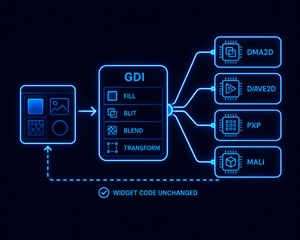
Sparklet's GDI (Graphics Device Interface) layer is the embedded GUI rendering engine that converts widget properties — position, colour, transparency, animation state — into pixel data on the display framebuffer. It does this with platform-agnostic APIs, routing rendering operations to pure software routines or hardware accelerators depending on the target MCU or MPU, with a dirty-region algorithm that minimises per-frame pixel work.

What Is an Embedded GUI Rendering Engine?

An embedded GUI rendering engine is the software component responsible for converting widget properties — position, size, colour, transparency, animation state — into pixel data written to the display framebuffer. Every frame, the rendering engine must decide which regions of the screen have changed, compute the correct pixel values for those regions (accounting for layering, alpha blending, clipping, and transformations), and transfer the result to the display controller.

On embedded hardware, this must happen within a fixed frame deadline — typically 16.7 ms for 60 fps. There is no excess CPU headroom. A poorly designed rendering engine burns every CPU cycle on pixel operations, leaving nothing for application logic, communication stacks, or RTOS tasks.

Sparklet's GDI layer solves this with three complementary strategies: a dirty-region algorithm that skips unchanged screen areas entirely; hardware accelerator routing that offloads pixel operations from the CPU to DMA2D, D/AVE2D, PXP, or Mali; and partial buffer rendering that eliminates the need for a second full-screen framebuffer in RAM-constrained designs. The result is a rendering engine that scales from a 16 KB RAM bare-metal MCU to a Linux MPU running OpenGL ES — with the same widget API throughout. See all Sparklet embedded GUI features →

Three Rendering Modes — One Widget API

Up in 30 minutes

Software Rendering

Software rendering is Sparklet's CPU-only pixel pipeline for MCUs without a hardware GPU. It handles fill, blit, alpha blend, rotate, scale, and font rasterisation entirely in optimised C code. Two mechanisms keep it practical on constrained hardware. Dirty-region rendering skips unchanged screen areas — on a typical industrial HMI where most of the display is a static background, 80–95% of pixels are never touched per frame. Partial buffer mode renders to a small scan-line buffer (as few as 1/8 of screen height) and flushes progressive bands via DMA, saving 200–400 KB RAM on QVGA/WVGA displays. Software rendering makes embedded UI feasible on entry-level MCUs such as the STM32F4 or Renesas RA6M3 without any GPU. How dirty-region and partial buffer rendering work →
Reliable and Proven

2.5D HW Accelerated

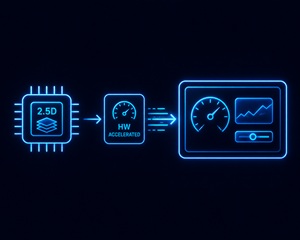
On MCUs and crossover MCUs with a 2D hardware accelerator, Sparklet's GDI layer routes rendering operations to the accelerator — DMA2D (STM32 F4/H7/U5), D/AVE2D (Renesas RH850/RA series), or PXP (NXP i.MX RT1170). The widget layer and application code are completely unaware of which execution path is used — the GDI API is identical. A fill operation that takes 800 µs in software completes in under 100 µs with DMA2D, freeing the CPU for application work. On an STM32H7 at 480 MHz with DMA2D enabled, Sparklet achieves 60 fps at WVGA (800×480) for typical HMI content. D/AVE2D on Renesas additionally supports anti-aliased line, arc, and polygon rendering — enabling smooth dial gauges and vector-style graphics without GPU overhead. PXP on NXP handles scaling, rotation, colour space conversion, and alpha compositing in a single DMA pass. Hardware acceleration deep dive →
Frame Budget Management: What the Rendering Engine Does Each Frame

Achieving consistent frame rates on embedded hardware requires predictable frame budget management. Sparklet's EXEC layer drives the frame scheduler, and within each frame the work is sequenced in a fixed priority order:

  1. Input processing — touch events and encoder inputs from interrupt-driven ring buffers are drained and dispatched to the widget tree.
  2. State machine execution — the RS_MIN HSM engine evaluates transitions triggered by input events or timer expiry and updates widget properties accordingly.
  3. Dirty region computation — all widgets whose properties changed during state machine execution mark their bounding rectangles dirty; the GDI merges these into a minimal repaint set.
  4. Rendering — the GDI renders only the dirty region, routing to software pipeline or hardware accelerator as configured for the target platform.
  5. Framebuffer flush — the rendered pixels are transferred to the display controller via DMA (non-blocking) or synchronous LCD write depending on the HAL implementation.

This sequencing ensures that input events are always processed before rendering, preventing the perceptible input lag that plagues rendering engines that batch input with the display refresh cycle. In full-buffer mode the flush step is a single DMA transfer that runs concurrently with the next frame's state machine processing. In partial-buffer mode, rendering of the next scan-line band is pipelined with the DMA flush of the current band — the CPU is never idle waiting for a transfer to complete.

Sparklet provides a frame timing diagnostic API that reports per-frame execution time breakdown by pipeline stage — useful for identifying whether frame budget overruns originate in state machine logic, dirty region size, or rendering operations. Real-time rendering and partial buffer mode →

Rendering Engine Capability by Platform

PlatformAcceleratorRendering ModeTypical FPS (WVGA)Min RAM (framebuffer)
STM32H7DMA2D (Chrom-ART)2.5D HW Accelerated60 fps~150 KB (partial buf)
STM32F4None2D Software30 fps (QVGA)~75 KB (partial buf)
Renesas RH850D/AVE2D (DRW)2.5D HW Accelerated60 fps~150 KB (partial buf)
Renesas RA8D1Mali-Limav GPU3D OpenGL ES60+ fpsFull framebuffer
NXP i.MX RT1170PXP2.5D HW Accelerated60 fps~150 KB (partial buf)
NXP i.MX 8Mali GPU3D OpenGL ES / Vulkan60+ fpsFull framebuffer
Any MCU (no GPU)None2D Software30–60 fps (screen-dependent)As low as 16 KB

GDI Layer Capabilities

Four core techniques that make Sparklet's rendering engine efficient on constrained embedded hardware.
Dirty Region

Dirty-Region Algorithm

80–95% of pixel operations skipped per frame on typical HMI screens — unchanged areas are never redrawn.

Partial Buffer

Partial Buffer Mode

Render to a scan-line strip and flush via DMA progressively. Saves 200–400 KB RAM on WVGA displays.

HW Routing

Accelerator Routing

GDI routes fill, blit, blend, and transform to DMA2D, D/AVE2D, PXP, or Mali — widget code unchanged.

Alpha Blend

Alpha Blending & Clipping

Per-pixel and per-widget alpha blending, rectangular clipping, and layered compositing supported in all rendering modes.

Embedded GUI Rendering Engine — Frequently Asked Questions

Each Sparklet widget maintains a dirty flag. When a widget property changes — a value update, an animation frame advance, a state change — the widget sets its dirty flag and marks its bounding rectangle as requiring repaint. Before each render frame, the GDI layer collects all dirty bounding rectangles, merges overlapping ones into a minimal union region, and renders only that region. Unchanged areas of the screen are not touched. On typical industrial HMI screens where most of the display is static background, this reduces per-frame pixel operations by 80–95% compared to full-screen redraw.

Evaluate Sparklet's Rendering Engine on Your Target Hardware

Request the free evaluation binary for your platform — STM32, Renesas, NXP, or simulator. Includes Flint UI Designer, sample projects, and full hardware acceleration support.