
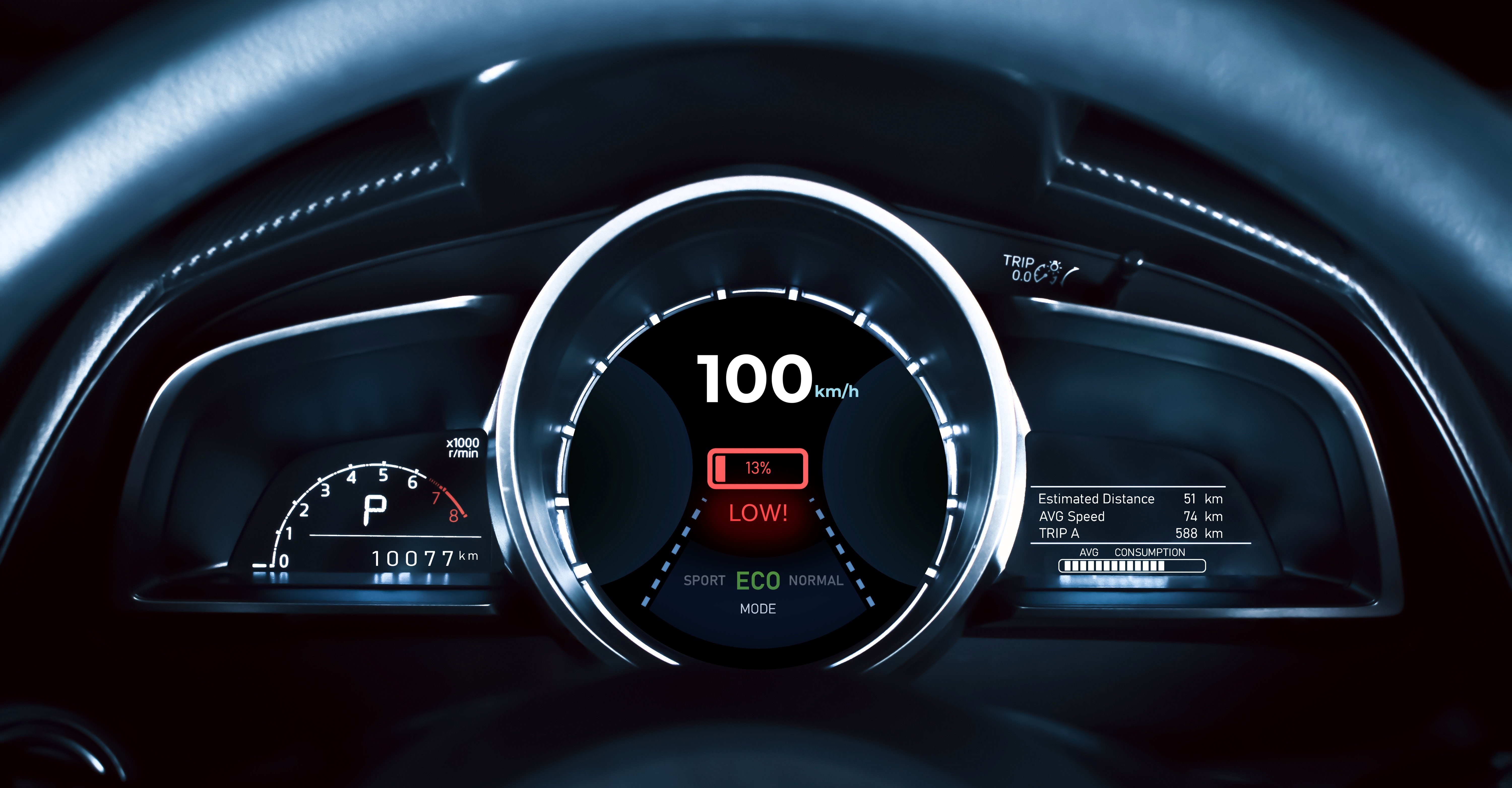
Typography is a critical aspect of embedded UI design. From automotive instrument clusters to industrial HMIs and consumer electronics, text must remain clear, consistent, and readable—often on small displays and resource‑constrained hardware. Managing fonts in such environments is challenging, especially when interfaces must display mixed content and support multiple languages.
Grouped Fonts in Sparklet UI Designer address these challenges by enabling flexible, mixed‑font text rendering within a single label. Grouped fonts are designed to simplify UI structure, improve visual hierarchy, and support static multilingual text rendering using Unicode fonts.
This blog explores how grouped fonts work conceptually, why they matter in embedded GUI design, and where they add the most value in real‑world applications.
The Challenge of Typography in Embedded Systems
Embedded displays operate under very different constraints compared to desktop or mobile platforms. Designers and developers frequently encounter issues such as:
- Limited flexibility in font usage due to performance constraints.
- Difficulty displaying mixed content such as numbers, units, symbols, and text together.
- Increasing demand for multilingual embedded UI with Unicode support.
- Complex layouts caused by splitting text across multiple labels.
Traditionally, addressing these challenges required workarounds—using multiple text widgets, handling font switching in code, or compromising on visual clarity. These approaches increase UI complexity and maintenance effort. Sparklet’s Grouped Fonts feature is designed to solve these typography challenges in a clean, scalable, and designer‑friendly way.
What Are Grouped Fonts in Sparklet UI Designer?
Grouped fonts in Flint UI Designer allow multiple individual font files to be combined into a single logical font group. This grouped font can then be assigned to a label widget, enabling Flint to automatically select the appropriate font for each character during rendering.
From a design perspective, grouped fonts behave like a single font, while internally supporting multiple font styles, sizes, or Unicode character ranges. This makes them ideal for mixed text rendering and static multilingual UI development in embedded systems.
Why Grouped Fonts Matter for Embedded UI Design
- Mixed Content Rendering in a Single Label: Many embedded UI designs require mixed typography within the same text element. For example, a numeric value may need to stand out, while its unit or description should appear smaller or lighter. With grouped fonts, all characters can be rendered within a single label widget, while still using different fonts where required. This eliminates the need for multiple overlapping labels and ensures consistent spacing and alignment.
- Clear Visual Hierarchy Without Additional Widgets: Visual hierarchy is essential in embedded displays where users rely on quick, glance‑based interaction. Grouped fonts make it possible to emphasize critical information—such as numeric values—while keeping supporting text subtle, all within one label. This approach: Improves readability, Reduces UI clutter, Avoids unnecessary widget duplication.
- Static Multilingual Text Rendering with Unicode Support: Modern embedded products are often deployed across global markets, making multilingual support a key requirement. Flint supports static text translation using EFR files, and grouped fonts play an important role in this workflow. By including multiple Unicode‑capable font files in a grouped font, Flint can correctly render translated text without requiring manual font switching. As long as the necessary glyphs are present, characters from different languages are displayed seamlessly.
- Consistent Alignment for Dynamic Values: Dynamic values in embedded UIs—such as speed, temperature, or sensor readings—change frequently. When text is split across multiple labels, alignment issues can occur as values grow or shrink. Grouped fonts keep all characters within a single label, ensuring stable alignment and consistent layout regardless of value changes.
Practical Use Cases for Grouped Fonts
- Automotive Instrument Clusters: Automotive dashboards commonly display large numeric values with smaller units—for example, speed and RPM. Grouped fonts allow these elements to be rendered together while preserving clear visual hierarchy, making them ideal for safety‑critical, glance‑friendly interfaces.
- Industrial and Medical HMIs: Industrial and medical displays rely on precise data presentation. Grouped fonts enable emphasis on critical values while keeping labels readable and consistent, improving usability without increasing layout complexity.
- Consumer Electronics and Appliances: Smart appliances and consumer devices often operate on small displays with limited resolution. Grouped fonts help achieve polished typography by combining icons, numbers, and text within compact UI layouts.
Conclusion
Grouped Fonts in Sparklet UI Designer are a powerful embedded UI typography feature that enables mixed content rendering, improves visual hierarchy, and simplifies static multilingual text display.
By allowing multiple font files to function as a single logical unit, grouped fonts reduce UI complexity while delivering clear, consistent, and scalable text rendering. For designers and developers building modern embedded GUIs, grouped fonts are an essential tool for creating flexible and globally ready user interfaces.
https://sparkletui.com/documentation/